
When I first ran ads, I thought bidding was simple. Set a budget, choose a bid, and let it run. But my campaigns were inconsistent. Some days I overpaid for clicks. Other days I lost my impressions.
That’s when I realized the importance of a proper google ads bidding strategy guide. Once I understood how bidding works, I stopped wasting money and started controlling performance.
If your PPC campaigns feel unpredictable, your bidding strategy is likely the reason.
Key Takeaways
- Bidding strategy directly impacts cost, visibility, and conversions
- Choosing the wrong bidding method leads to wasted budget
- Smart bidding improves efficiency and performance
- Data-driven bidding decisions produce better results
- Optimization is essential for long-term success
What Is Google Ads Bidding (Simple Explanation)
Bidding determines how much you are willing to pay for a click. But it’s not just about paying more. Google uses bidding along with Quality Score to decide:
- Which ads appear
- Where they appear
- How much you pay
That means even with a lower bid, you can still rank higher if your campaign is optimized.
Why Bidding Strategy Matters More Than Budget
Increasing budget alone does not improve performance. I’ve seen campaigns with small budgets outperform larger ones because they used smarter bidding. A strong bidding strategy helps you:
- Control costs
- Improve ad position
- Increase conversions
That’s why I focus on bidding before scaling campaigns.
Step 1: Choose the Right Bidding Strategy
Google Ads offers multiple bidding options.
I select based on campaign goals:
- Manual CPC for control
- Maximize Clicks for traffic
- Maximize Conversions for results
- Target CPA for cost control
- Target ROAS for revenue focus
Choosing the wrong strategy leads to poor performance.
Step 2: Start with Manual Bidding for Better Control
When I begin a new campaign, I often start with manual CPC.
It helps me:
- Understand keyword performance
- Control initial spending
- Collect data
Once I have enough data, I switch to automated strategies.
Step 3: Use Smart Bidding for Optimization
Smart bidding uses AI to adjust bids automatically. It considers factors like:
- Device
- Location
- Time of day
- User behavior
This helps improve performance without constant manual adjustments. If you want to explore automation further, read: ai tools for ppc campaigns
AI-powered bidding can improve efficiency significantly.
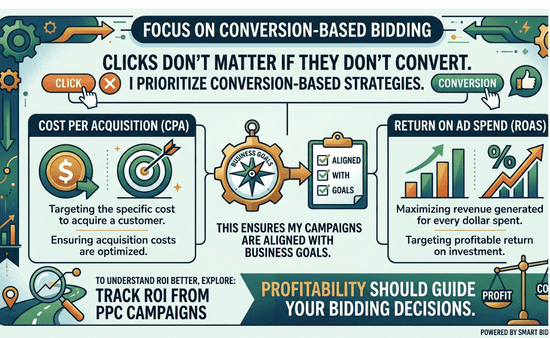
Step 4: Focus on Conversion-Based Bidding
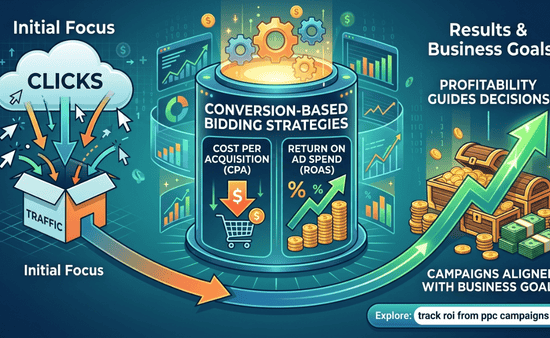
Clicks don’t matter if they don’t convert. That’s why I prioritize conversion-based strategies. I focus on:
- Cost per acquisition (CPA)
- Return on ad spend (ROAS)
This ensures my campaigns are aligned with business goals.
To understand ROI better, explore: track roi from ppc campaigns
Profitability should guide your bidding decisions.
Step 5: Adjust Bids Based on Performance
Not all keywords perform equally. I regularly adjust bids based on:
- Conversion rate
- Cost per conversion
- Keyword performance
High-performing keywords get higher bids. Low-performing ones get reduced or paused.
Step 6: Improve Quality Score to Reduce Bids
One of the biggest lessons I learned: You don’t always need to bid higher. Improving Quality Score can reduce your cost per click. I focus on:
- Ad relevance
- Click-through rate
- Landing page experience
If you want to improve this further, refer to: google ads quality score improvement
Better Quality Score lowers costs naturally.
Step 7: Control Costs Without Losing Performance
Reducing costs without hurting results requires balance. I focus on:
- Eliminating wasted spend
- Improving targeting
- Adjusting bids strategically
If you’re struggling with high costs, this helps: reduce ppc cost without losing traffic
Efficiency is more important than budget size.
Step 8: Monitor and Optimize Continuously
Bidding is not a one-time setup. I regularly:
- Review campaign performance
- Adjust strategies
- Test new approaches
Optimization keeps campaigns efficient over time.
Common Mistakes in Google Ads Bidding
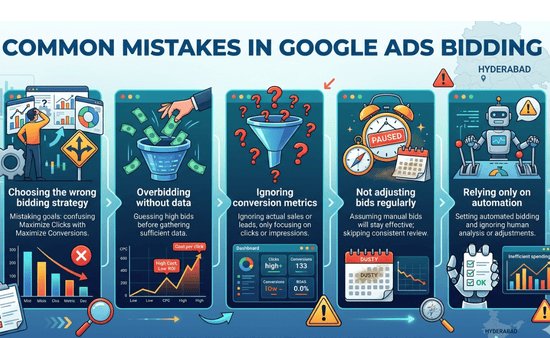
I’ve made these mistakes before:
- Choosing the wrong bidding strategy
- Overbidding without data
- Ignoring conversion metrics
- Not adjusting bids regularly
- Relying only on automation
Avoiding these mistakes improves campaign performance.
How Long Does It Take to Optimize Bidding?
From my experience:
- Initial setup: a few days
- Early adjustments: 1–2 weeks
- Strong optimization: 1–2 months
Bidding improves as more data becomes available.
What Actually Makes a Bidding Strategy Work
Here’s what I learned: A successful bidding strategy is not about spending more. It’s about alignment.
- Bids match campaign goals
- Keywords match intent
- Ads match user expectations
When everything aligns, performance improves.
Frequently Asked Questions
1. What is the best bidding strategy for beginners?
Manual CPC is a good starting point because it gives you control and helps you understand how your campaign performs before switching to automation.
2. Should I use automated bidding?
Yes, once you have enough data. Automated bidding can improve efficiency, but it works best when supported by accurate tracking.
3. How do I reduce CPC in Google Ads?
Improving Quality Score, refining targeting, and optimizing ad relevance are the most effective ways to lower cost per click.
4. How often should I adjust bids?
Review bids weekly and adjust based on performance data to maintain efficiency.
A Smarter Way to Control PPC Costs and Performance
Following a google ads bidding strategy guide changed how I manage campaigns.
I stopped guessing and started controlling outcomes. That shift improved both efficiency and results. If you choose the right bidding strategy, focus on performance data, and optimize consistently, you won’t just run ads.
You’ll build campaigns that deliver predictable and profitable results.